Buying & Setup Guides
Smart Bird Feeder Apps Compared
You will spend far more time in the app than looking at the feeder. It is also the part you cannot evaluate before buying, and the part most likely to change under you.
How this page is funded. Buying through a link here earns us a commission at no extra cost to you. It does not change what we recommend or the order we recommend it in, and we have not handled any of these products ourselves - see how we pick and the full disclosure.
The camera is the thing you buy. The app is the thing you use - several times a day, for years - and it is the part of the purchase you can evaluate least before committing to it.
It is also, uncomfortably, the part that can change after you buy. Hardware is fixed on the day it ships; an app can add a paywall, remove a feature or be discontinued entirely. That asymmetry is worth holding in mind.
What every app in this category does
- A timeline of clips, newest first, with the identified species labeled.
- Push notifications when something visits - almost always too many by default.
- Species identification, server-side, frequently behind a paid tier.
- A collection or 'life list' of species seen at your feeder, which is the feature people turn out to enjoy most.
- Battery and connection status, and usually a live view.
The differences between makers are matters of polish and pricing rather than capability. Nobody is missing a fundamental feature; the question is what is free, what is not, and how pleasant it is to use.
The paywall is the real difference
Since capability is broadly similar, the meaningful comparison is which side of the paywall the features sit on - and that varies substantially. On some models identification requires the paid tier outright; on others a plan is offered and its price is not published; on a few there is no plan at all.
That distribution, not the interface, is what should drive your choice. The full picture is in the subscription cost guide and the models with no recurring charge are collected in the no-subscription roundup.
Quick picks
Ranked on published specifications and what each one costs to own. Every pick names the buyer it is wrong for.
| # | Product | Best for | Price |
|---|---|---|---|
| 1 |  Birdbuddy Pro Solar The largest published sensor in the category and the only maker that declines to advertise a species count - both of which point the same way. | The best pictures, if you can live with the app | |
| 2 |  Birdfy 2 Pro Solar Two lenses, a stated 9,000mAh battery and a stated 3W panel. Birdfy publishes numbers other makers hide, and the numbers are good. | The most published specification of anything here | |
| 3 | 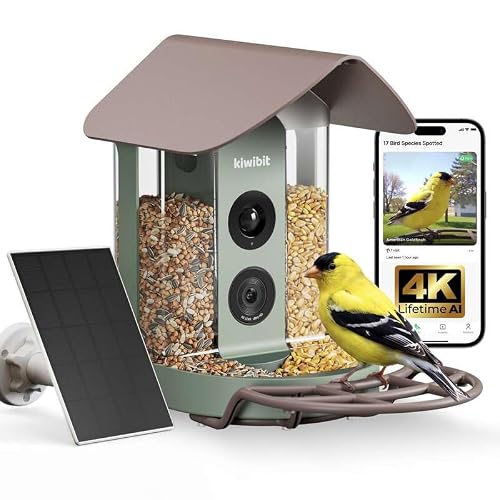 Kiwibit 4K, No-Subscription Edition The same hardware with lifetime AI identification stated on the listing. For a gift, that single line is worth more than any spec on it. | A gift that will never send anyone a bill |
1. The best pictures, if you can live with the app
Birdbuddy Pro Solar
The largest published sensor in the category and the only maker that declines to advertise a species count - both of which point the same way.
A 1/2.7" sensor is a real, checkable number, and it is bigger than anything else in this category will admit to. Sensor area is what governs how a photo looks when a bird lands at dusk, which is when most feeder traffic actually happens. Nobody else publishes the figure, so nobody else can be compared to it.
The thing worth noticing is what is missing. Every rival leads with an AI number - 6,000 species, 10,000 species. Birdbuddy prints none. A maker that does not put a number on its recognition claim is a maker with nothing to walk back, and after you read the species-claim audit that reads as confidence rather than as a gap.
The Wi-Fi position is the one to check before you buy. Birdbuddy's own support documentation says the original camera module requires 2.4GHz and does not work on 5GHz. If your router broadcasts one merged network name, that is the setup that fails - and the fix takes ten minutes once you know about it. It is covered in the Wi-Fi requirements guide.
| Video resolution | 2KSource: Birdbuddy Pro Solar - manufacturer listing on Amazon, retrieved 1 September 2026 |
|---|---|
| Photo resolution | 5MPSource: Birdbuddy Pro Solar - manufacturer listing on Amazon, retrieved 1 September 2026 |
| Sensor size | 1/2.7"The only sensor dimension published by any maker in this roundup.Source: Birdbuddy Pro Solar - manufacturer listing on Amazon, retrieved 1 September 2026 |
| Dynamic range | HDRSource: Birdbuddy Pro Solar - manufacturer listing on Amazon, retrieved 1 September 2026 |
| Wi-Fi band | 2.4GHz for the original camera module; the Birdbuddy 2 module adds 5GHzBirdbuddy's own support pages state the original module does not work on 5GHz.Source: Birdbuddy support: Connectivity and Wi-Fi requirements |
| Solar | Detachable solar roof, rotates 180 degreesSource: Birdbuddy Pro Solar - manufacturer listing on Amazon, retrieved 1 September 2026 |
| Battery capacity | Not publishedNo mAh figure appears on the listing or the support site. |
| Species identified | Not publishedBirdbuddy publishes no species count anywhere we could find. See the AI claims audit. |
| Subscription price | Not publishedNot stated on the listing, and the plan page did not serve us a price. |
What it does well
- Published 1/2.7" sensor with HDR - the only sensor dimension anyone in the category states
- Solar roof detaches and rotates, so the panel can face the sun even when the feeder cannot
- Makes no species-count claim, which is the honest position given the arithmetic
- The largest accessory ecosystem in the category, including perch extenders and nutrition sets
What it does not
- Battery capacity is not published, so runtime cannot be estimated from first principles
- The original camera module is 2.4GHz-only per Birdbuddy's own support pages
- Subscription pricing is not stated on the listing and was not retrievable from the plan page
Skip this: if you want every feature unlocked with no ongoing decision to make. Birdbuddy's premium tier exists, its price is not published where a buyer can find it, and buying into an unpriced subscription is exactly the trap the three-year cost guide was written about.
2. The most published specification of anything here
Birdfy 2 Pro Solar
Two lenses, a stated 9,000mAh battery and a stated 3W panel. Birdfy publishes numbers other makers hide, and the numbers are good.
A 9,000mAh cell paired with a 3W panel is the most generous published power budget in the category, and it is the reason this model turns up in so many yards that get only morning sun. It is also, notably, a number: Birdfy states it, most rivals do not, and a stated number is one you can hold them to.
The dual-lens arrangement is a genuine design decision rather than a spec-sheet flourish. One lens frames the whole feeder, the other pushes in on the perch. What that buys you is a photo where the bird fills the frame without the wide shot becoming useless - which is precisely the complaint people have about single-lens feeders.
The species claim is where to be careful. 6,000+ is a claim by the maker. There are 11,227 bird species on Earth by the current IOC list, and 1,161 in the whole ABA Area. What a 6,000-species model can honestly do in a North American backyard is worked through in the AI claims audit.
Operating range is stated at 14F to 113F. If you live somewhere that spends February below 14F, that is a published limit, not a rumor, and it should decide your purchase.
| Camera system | Dual lens: 1080P wide + 2K auto-tracking close-up, with split viewSource: Birdfy 2 Pro Solar - manufacturer listing on Amazon, retrieved 1 September 2026 |
|---|---|
| Battery capacity | 9,000mAhThe largest published capacity of any feeder on this site, and one of only four published at all.Source: Birdfy 2 Pro Solar - manufacturer listing on Amazon, retrieved 1 September 2026 |
| Solar panel | 3WSource: Birdfy 2 Pro Solar - manufacturer listing on Amazon, retrieved 1 September 2026 |
| Species identified | 6,000+ claimedA claim by the maker, not a verified figure. See the audit.Source: Birdfy 2 - manufacturer listing on Amazon, retrieved 1 September 2026 |
| Operating range | 14F to 113FSource: Birdfy 2 - manufacturer listing on Amazon, retrieved 1 September 2026 |
| Sharing | 20+ accountsSource: Birdfy 2 - manufacturer listing on Amazon, retrieved 1 September 2026 |
| Sensor size | Not publishedResolution is published; the sensor dimension behind it is not. |
| Subscription price | Not published |
What it does well
- 9,000mAh battery and 3W panel, both published - the best documented power budget here
- Dual lens gives a wide frame and a close-up without choosing between them
- Publishes an operating temperature range, which almost nobody else does
- Shares to 20+ accounts, which matters if this is a gift for a household
What it does not
- The 6,000+ species claim is far larger than any North American backyard can exercise
- Sensor dimensions are not published, so image quality cannot be compared to Birdbuddy's
- Subscription pricing is not stated on the listing
Skip this: if you live where winter regularly drops below 14F. Birdfy publishes that as the bottom of the operating range, and a camera that stops in January is a camera you bought for eight months of the year.
3. A gift that will never send anyone a bill
Kiwibit 4K, No-Subscription Edition
The same hardware with lifetime AI identification stated on the listing. For a gift, that single line is worth more than any spec on it.
A gift that arrives with a monthly fee attached is a gift that keeps asking the recipient for money. That is the whole argument for this variant, and it is why it leads the no-subscription roundup.
Read the wording carefully before you buy, though, because it is the wording that matters. The listing says lifetime AI identification, not lifetime cloud storage, and those are different promises. Storage terms in this category change quietly, and a lifetime claim on one feature says nothing about the other.
Everything else is the Kiwibit 4K platform: the same 5,200mAh cell, the same 4K stream, the same 8MP stills.
| Subscription | No subscription; lifetime AI identification stated on the listingSource: Kiwibit no-subscription - manufacturer listing on Amazon, retrieved 1 September 2026 |
|---|---|
| Video resolution | 4K live streamSource: Kiwibit no-subscription - manufacturer listing on Amazon, retrieved 1 September 2026 |
| Photo resolution | 8MPSource: Kiwibit no-subscription - manufacturer listing on Amazon, retrieved 1 September 2026 |
| Solar | Solar poweredSource: Kiwibit no-subscription - manufacturer listing on Amazon, retrieved 1 September 2026 |
| Battery capacity | 5,200mAhPublished for the Kiwibit 4K platform.Source: Kiwibit 4K - manufacturer listing on Amazon, retrieved 1 September 2026 |
| Sensor size | Not published |
| Species identified | Not publishedThis listing states lifetime identification without naming a count. |
What it does well
- Lifetime AI identification stated in writing on the maker's own listing
- Nothing to explain to the person you gave it to
- Same published 4K and 8MP capture as the subscription variant
What it does not
- Lifetime AI is not the same promise as lifetime cloud storage
- No published sensor size
- The species count is not stated on this variant, so it cannot be compared like for like
Skip this: if you want the deepest cloud archive you can get. A no-subscription model is a model with a smaller storage story, and if you plan to keep three years of clips you should read the three-year cost comparison before deciding.
What we cannot tell you, and why
We have not used these apps day to day. We have not lived with the notification behavior for a season, we do not know which one crashes on your phone, and we cannot compare identification accuracy without running the same birds past all of them.
Sites that rank these apps confidently are either drawing on genuine long-term use they should describe, or they are guessing. We are not going to guess and then present it as a finding - it would be the same fabrication as inventing a subscription price. How we pick sets out where our method stops.
How to evaluate an app before buying
Three checks that are actually available to you
- 1
Download it before you buy the feeder
All of these apps are free to install. Most will let you see the interface, the onboarding and often the plan structure without owning hardware - which is the closest thing to a trial that exists here.
- 2
Read the store listing's recent reviews, filtered to the newest
App store reviews are noisy, but a cluster of recent complaints about a new paywall or a broken update is a real signal - and it is dated, which most other evidence about apps is not.
- 3
Check when it was last updated
An app that has not been updated in a long time on a device category this young is the single clearest warning sign available. These are app-dependent products, and an abandoned app makes the hardware worthless.
The notification problem, and its fix
Every one of these apps over-notifies by default, and a busy feeder can generate dozens of alerts a day. The predictable result is that people mute the app within a fortnight and then stop opening it.
The fix takes a minute and it is the single best thing you can do for your enjoyment of the product: switch to a daily digest, or to alerts only for species new to your collection. That turns a stream of interruptions back into something you look forward to. It is in the setup guide for a reason.
One free app worth having regardless
Merlin, from the Cornell Lab of Ornithology. It is free, it identifies birds by photo, sound and description, and it narrows candidates using your location and date - the constraint that makes identification tractable and the thing feeder apps advertising huge global species counts conspicuously do not do.
It cannot watch your feeder, so it is not a substitute for the camera. It is an excellent cross-check when your feeder app names something surprising, and the identification audit explains why that cross-check is worth having.
Questions people actually ask
Which smart bird feeder app is best?
We will not rank them, because we have not lived with them day to day and a confident ranking would be invented. The difference that is knowable and that matters most is which features sit behind the paywall.
Can I try the app before buying the feeder?
Usually yes - these apps are free to install and most will show you the interface and often the plan structure without hardware. It is the closest thing to a trial available.
Do the apps work without a subscription?
The camera, clips and notifications generally do. Species identification frequently does not - it is the feature most commonly held behind the paid tier.
What if the maker discontinues the app?
The camera loses most of its function, which is the underlying risk with every product in this category. It is why a maker's track record is worth weighing, particularly against a lifetime license paid up front.
Is Merlin a replacement for the feeder app?
No - it cannot watch your feeder. It is a free and very good cross-check when your feeder app identifies something implausible.