Buying & Setup Guides
Are Smart Bird Feeders Worth It?
The question people ask right before they spend two hundred dollars, and it deserves a real answer rather than a sales pitch. Here is what the money buys, what it does not, and who should not spend it.
How this page is funded. Buying through a link here earns us a commission at no extra cost to you. It does not change what we recommend or the order we recommend it in, and we have not handled any of these products ourselves - see how we pick and the full disclosure.
A smart bird feeder costs somewhere between the price of a nice dinner and the price of a phone, depending which one you pick. That is a wide enough range that "is it worth it" has no single answer - but it has a structure, and working through that structure takes about five minutes and will tell you whether you are the buyer who loves one or the buyer who lists it on Marketplace in March.
We sell nothing and we have not handled any of these products. What follows is the arithmetic, the published specifications, and the failure modes we can document - including the ones that make this a bad purchase for some people.
The four questions that decide it
Before any product comparison, these are the things that actually determine whether you will be glad you bought one. Answer them honestly and the purchase mostly decides itself.
1. Will it reach your Wi-Fi?
This is the single most common reason a smart feeder goes back to the retailer, and it has nothing to do with the camera. Nearly every model in this category connects only to 2.4GHz Wi-Fi. Most modern routers and effectively every mesh system broadcast 2.4GHz and 5GHz under one network name and steer devices between them - and a 2.4GHz-only device frequently cannot join that network at all.
The failure looks exactly like a broken product: the app scans, finds nothing, times out, and every other device in your house works fine. It is a router configuration problem and it takes about ten minutes to fix once you know it is coming. If you are not willing to go into your router settings, weigh that honestly now rather than on a Saturday morning. The Wi-Fi requirements guide is the fix.
2. What does the subscription cost - and can you even find out?
The listing price is an entry fee, not the cost. Species identification, which is the feature the entire category is advertised on, is routinely held behind a recurring plan. And the price of that plan is routinely absent from the listing you buy from.
The arithmetic that matters is hardware plus plan times thirty-six. At ordinary rates in this category a monthly plan over three years is frequently comparable to the price of the feeder itself, which means the cheapest hardware attached to a required plan is often the most expensive thing on the shelf by month eighteen. The three-year cost guide shows the sum with the inputs visible.
This is where most of the regret in this category lives, and it is entirely avoidable: models exist that charge nothing recurring at all.
3. Does your yard get sun?
Solar roofs are standard now and they work - in direct sun. Under a mature tree or a north-facing fence, a solar feeder is a battery feeder you have to take down and charge, and the panel is decoration. Stand where the feeder will hang, look up, and see how much open sky there is between mid-morning and mid-afternoon. Do it with the leaves on.
If the answer is "not much", you are buying a device with a charging routine. That is fine if you know it going in and a genuine annoyance if you do not.
4. Do you actually want the photographs, or the notifications?
These are different products wearing the same shell. If what you want is a stream of pictures of birds, optics matter and you should pay for them. If what you want is to know when something interesting turns up, a cheaper camera does that job identically and the money is better spent elsewhere.
Quick picks
Ranked on published specifications and what each one costs to own. Every pick names the buyer it is wrong for.
| # | Product | Best for | Price |
|---|---|---|---|
| 1 | 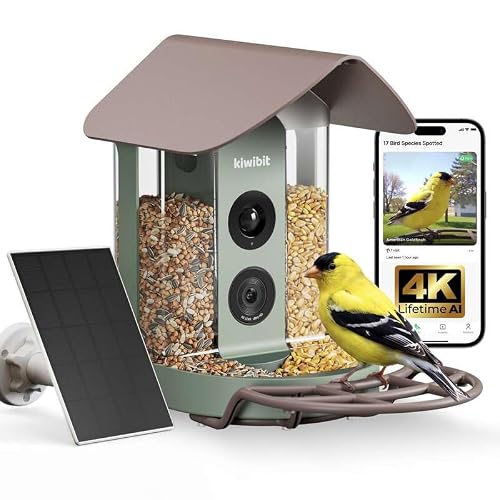 Kiwibit 4K, No-Subscription Edition The same hardware with lifetime AI identification stated on the listing. For a gift, that single line is worth more than any spec on it. | A gift that will never send anyone a bill | |
| 2 |  Birdbuddy Pro Solar The largest published sensor in the category and the only maker that declines to advertise a species count - both of which point the same way. | The best pictures, if you can live with the app | |
| 3 |  Netvue Birdfy Lite The entry Birdfy: adjustable brackets, free cloud storage stated on the listing, and the same 6,000+ species claim as its expensive siblings. | The cheapest way into the category |
1. A gift that will never send anyone a bill
Kiwibit 4K, No-Subscription Edition
The same hardware with lifetime AI identification stated on the listing. For a gift, that single line is worth more than any spec on it.
A gift that arrives with a monthly fee attached is a gift that keeps asking the recipient for money. That is the whole argument for this variant, and it is why it leads the no-subscription roundup.
Read the wording carefully before you buy, though, because it is the wording that matters. The listing says lifetime AI identification, not lifetime cloud storage, and those are different promises. Storage terms in this category change quietly, and a lifetime claim on one feature says nothing about the other.
Everything else is the Kiwibit 4K platform: the same 5,200mAh cell, the same 4K stream, the same 8MP stills.
| Subscription | No subscription; lifetime AI identification stated on the listingSource: Kiwibit no-subscription - manufacturer listing on Amazon, retrieved 1 September 2026 |
|---|---|
| Video resolution | 4K live streamSource: Kiwibit no-subscription - manufacturer listing on Amazon, retrieved 1 September 2026 |
| Photo resolution | 8MPSource: Kiwibit no-subscription - manufacturer listing on Amazon, retrieved 1 September 2026 |
| Solar | Solar poweredSource: Kiwibit no-subscription - manufacturer listing on Amazon, retrieved 1 September 2026 |
| Battery capacity | 5,200mAhPublished for the Kiwibit 4K platform.Source: Kiwibit 4K - manufacturer listing on Amazon, retrieved 1 September 2026 |
| Sensor size | Not published |
| Species identified | Not publishedThis listing states lifetime identification without naming a count. |
What it does well
- Lifetime AI identification stated in writing on the maker's own listing
- Nothing to explain to the person you gave it to
- Same published 4K and 8MP capture as the subscription variant
What it does not
- Lifetime AI is not the same promise as lifetime cloud storage
- No published sensor size
- The species count is not stated on this variant, so it cannot be compared like for like
Skip this: if you want the deepest cloud archive you can get. A no-subscription model is a model with a smaller storage story, and if you plan to keep three years of clips you should read the three-year cost comparison before deciding.
2. The best pictures, if you can live with the app
Birdbuddy Pro Solar
The largest published sensor in the category and the only maker that declines to advertise a species count - both of which point the same way.
A 1/2.7" sensor is a real, checkable number, and it is bigger than anything else in this category will admit to. Sensor area is what governs how a photo looks when a bird lands at dusk, which is when most feeder traffic actually happens. Nobody else publishes the figure, so nobody else can be compared to it.
The thing worth noticing is what is missing. Every rival leads with an AI number - 6,000 species, 10,000 species. Birdbuddy prints none. A maker that does not put a number on its recognition claim is a maker with nothing to walk back, and after you read the species-claim audit that reads as confidence rather than as a gap.
The Wi-Fi position is the one to check before you buy. Birdbuddy's own support documentation says the original camera module requires 2.4GHz and does not work on 5GHz. If your router broadcasts one merged network name, that is the setup that fails - and the fix takes ten minutes once you know about it. It is covered in the Wi-Fi requirements guide.
| Video resolution | 2KSource: Birdbuddy Pro Solar - manufacturer listing on Amazon, retrieved 1 September 2026 |
|---|---|
| Photo resolution | 5MPSource: Birdbuddy Pro Solar - manufacturer listing on Amazon, retrieved 1 September 2026 |
| Sensor size | 1/2.7"The only sensor dimension published by any maker in this roundup.Source: Birdbuddy Pro Solar - manufacturer listing on Amazon, retrieved 1 September 2026 |
| Dynamic range | HDRSource: Birdbuddy Pro Solar - manufacturer listing on Amazon, retrieved 1 September 2026 |
| Wi-Fi band | 2.4GHz for the original camera module; the Birdbuddy 2 module adds 5GHzBirdbuddy's own support pages state the original module does not work on 5GHz.Source: Birdbuddy support: Connectivity and Wi-Fi requirements |
| Solar | Detachable solar roof, rotates 180 degreesSource: Birdbuddy Pro Solar - manufacturer listing on Amazon, retrieved 1 September 2026 |
| Battery capacity | Not publishedNo mAh figure appears on the listing or the support site. |
| Species identified | Not publishedBirdbuddy publishes no species count anywhere we could find. See the AI claims audit. |
| Subscription price | Not publishedNot stated on the listing, and the plan page did not serve us a price. |
What it does well
- Published 1/2.7" sensor with HDR - the only sensor dimension anyone in the category states
- Solar roof detaches and rotates, so the panel can face the sun even when the feeder cannot
- Makes no species-count claim, which is the honest position given the arithmetic
- The largest accessory ecosystem in the category, including perch extenders and nutrition sets
What it does not
- Battery capacity is not published, so runtime cannot be estimated from first principles
- The original camera module is 2.4GHz-only per Birdbuddy's own support pages
- Subscription pricing is not stated on the listing and was not retrievable from the plan page
Skip this: if you want every feature unlocked with no ongoing decision to make. Birdbuddy's premium tier exists, its price is not published where a buyer can find it, and buying into an unpriced subscription is exactly the trap the three-year cost guide was written about.
3. The cheapest way into the category
Netvue Birdfy Lite
The entry Birdfy: adjustable brackets, free cloud storage stated on the listing, and the same 6,000+ species claim as its expensive siblings.
The Lite exists to get you into the category for as little as possible, and it does that job. What it does not do is publish its capture resolution, which is a meaningful omission on a product whose entire purpose is taking pictures.
The free-cloud-storage line is the most interesting thing on the listing, because free storage is the feature that most often turns out to be the subscription hook. Read the current terms at the point of purchase rather than trusting a review - ours included.
If your budget is the constraint, this or one of the picks in the under-$100 roundup is where to look. If image quality is the constraint, look at the flagship roundup instead.
| Species identified | 6,000+ claimedA claim by the maker.Source: Birdfy Lite - manufacturer listing on Amazon, retrieved 1 September 2026 |
|---|---|
| Cloud storage | Free cloud storage stated on the listingSource: Birdfy Lite - manufacturer listing on Amazon, retrieved 1 September 2026 |
| Mounting | Adjustable bracketsSource: Birdfy Lite - manufacturer listing on Amazon, retrieved 1 September 2026 |
| Smart home | Works with AlexaSource: Birdfy Lite - manufacturer listing on Amazon, retrieved 1 September 2026 |
| Video resolution | Not publishedThe Lite listing does not state a capture resolution. |
| Battery capacity | Not published |
| Solar | Not publishedSolar is sold separately on this model. |
What it does well
- The lowest barrier to entry in the Birdfy line
- Free cloud storage stated on the maker's own listing
- Adjustable brackets suit an awkward mounting spot
- Alexa support, which none of the premium models here advertise
What it does not
- No published capture resolution at all - unusual and unhelpful
- Solar is a separate purchase
- Carries the same 6,000+ species claim as the flagship, which is telling
Skip this: if the photographs are the point. A feeder camera that will not state its own resolution is a feeder camera you are buying blind, and for a small step up the Birdfy 2 Pro publishes everything.
What the money genuinely buys
Three things, and they are worth stating plainly because they are real.
Close-up footage you cannot otherwise get. A camera eight inches from a perch shows you plumage detail, feeding behavior and interactions that are invisible from a window twenty feet away. This is the actual product and it delivers.
Identification that teaches you. The genuine value of the AI is not naming rarities. It is telling a beginner that the small brown bird is a house finch rather than a sparrow, reliably, thirty times a week, until they stop needing to be told. That is a good feature doing useful work.
A record. You see what visits while you are at work, and over a season you accumulate a species list for your own yard. Project FeederWatch's published state counts put the realistic size of that list at roughly two dozen birds - we set three states side by side here - which is smaller than the marketing implies and more interesting than it sounds.
What the money does not buy
Ten thousand species. Makers advertise identification of 6,000 to 10,000+ species. The IOC World Bird List recognizes 11,227 species of which 164 are extinct; the ABA checklist for the whole of North America is 1,161. A 10,000-species claim is a claim about a classifier, not a promise about your garden, and every app in this category handles the two dozen birds that will actually turn up. The full audit is here.
Instant results. A new feeder anywhere takes days to weeks to be found and trusted. An empty feeder for a fortnight is normal, not a fault, and it is the point at which people conclude the camera is broken. The setup guide covers the first three weeks.
Freedom from maintenance. It is still a bird feeder. It needs refilling, and it needs cleaning, and a neglected feeder is worse for birds than no feeder.
A cheaper route if you already have a feeder. A trail camera strapped to a post and pointed at your existing feeder costs far less and needs no subscription - it just will not name the birds, and it may not focus that close. The comparison is here.
Squirrel immunity. Most camera feeders are plastic and most are not built against squirrels. That is a separate product category with its own compromises, covered in the squirrel-proof roundup.
Four buyers who should not buy one
We would rather lose the sale than have you buy the wrong thing, so here is the specific list.
- Anyone unwilling to touch their router. The 2.4GHz problem is common and the fix is a router setting. If that is a hard no, this category will probably frustrate you.
- Anyone who reacts badly to recurring charges and does not check first. Buying a cheap feeder with a required plan is the single worst-value configuration in this category, and it is the one a price-sorted search pushes you toward.
- Anyone whose feeder site is deeply shaded and who wants zero maintenance. The solar roof will not save you; plan on a charging routine or choose differently.
- Anyone buying it as a gift without checking the recipient's Wi-Fi and yard. A present that cannot connect is a present that goes back. The gift roundup ranks specifically on that risk.
The configuration that is actually worth it
If you take one thing from this page: the value question in this category is decided by the billing model far more than by the camera.
| Configuration | Verdict |
|---|---|
| Mid-price hardware, no subscription | The best value in the category. Nothing recurring, decent optics, and the sum is the sticker price. |
| Hardware plus a one-off lifetime AI license | Usually second best - but read the wording, because lifetime identification is not lifetime cloud storage. |
| Premium hardware with an optional plan you decline | Fine, if you genuinely decline it. The optics are the thing you are paying for. |
| Cheap hardware with a required plan | The worst value over three years, and the configuration a price-sorted search pushes buyers toward. |
That is why the no-subscription model leads the picks above rather than the best camera. On a three-year view it is the arrangement that makes the purchase defensible, and the no-subscription roundup collects the models that offer it.
What happens if you stop
A question worth asking before you buy, because the answer differs sharply by model. If you cancel a subscription, cloud video history generally goes with it - local storage on an SD card, where a model offers it, does not. And if a maker discontinues its app, the camera stops being a camera, because identification and in many cases the live view run server-side.
That is the real argument for weighting company track record and for preferring a one-off payment over a recurring one. It is also why the resale value of these is poor: a used feeder camera is worth what the next person thinks the app will keep doing.
So: worth it?
Yes, if you have Wi-Fi that reaches the feeder site, you buy a configuration with no recurring charge, and you want the close-up footage rather than a novelty. On those terms it is a device people use every day for years, which is a higher bar than most garden purchases clear.
No, if you are buying it because the box says ten thousand species, if your feeder site is forty feet from the router behind a brick wall, or if you have not checked what the plan costs. Those three account for most of the disappointment in this category, and all three are knowable before you spend anything.
If you are still in, the flagship roundup ranks the field on published specifications, and the buying guide covers which specifications actually matter.
Questions people actually ask
Are smart bird feeders worth the money?
If your Wi-Fi reaches the feeder and you buy a configuration with no recurring charge, yes - the close-up footage is genuinely something you cannot get any other way. If you buy cheap hardware attached to a required subscription, it is the worst-value arrangement in the category over three years.
What is the biggest reason people regret buying one?
Two, in order: the camera would not join their Wi-Fi, because nearly all of these are 2.4GHz-only and modern routers broadcast both bands under one name; and the subscription turned out to cost more than they expected, because most makers do not publish the plan price on the listing.
Do you have to pay a subscription for a smart bird feeder?
Not necessarily. Species identification is the feature most often held behind a plan, but several models state lifetime identification or no subscription at all. Those are collected in the no-subscription roundup.
How long before birds use it?
Days to weeks. A new feeder anywhere takes time to be found and trusted, and an empty feeder for a fortnight is normal rather than a fault - it is the point at which most people wrongly conclude the camera is broken.
Is the AI identification actually accurate?
Nobody publishes an accuracy figure, so we cannot tell you. What we can say is that the headline species counts do not discriminate between products: every app in the category covers the couple of dozen birds that will visit a US backyard.
Is a cheap smart bird feeder worth it?
It can be, provided it is not the cheap-hardware-plus-required-plan combination. Check what identification costs before you buy - a feeder that is cheapest on day one is frequently the most expensive by month eighteen.
Sources
- IOC World Bird List v15.2 (13 April 2026), International Ornithologists' Union
- ABA Checklist v8.19 (January 2026), American Birding Association
- Project FeederWatch, Cornell Lab of Ornithology
- Birdbuddy support: Connectivity and Wi-Fi requirements
- Amazon Services LLC Associates Program operating agreement