Buying & Setup Guides
Do Bird Feeder Cameras Need Wi-Fi?
Yes - all of them, for setup and for everything the app does afterwards. The useful question is what to buy when the spot you want is out of range, and there are three real answers.
How this page is funded. Buying through a link here earns us a commission at no extra cost to you. It does not change what we recommend or the order we recommend it in, and we have not handled any of these products ourselves - see how we pick and the full disclosure.
Yes. Every smart bird feeder camera on this site needs Wi-Fi, and it needs it twice: once to pair the device during setup, and then permanently, because the live view, the clips, the notifications and the species identification all travel over your network. There is no offline mode and no Bluetooth-only mode. If there is no Wi-Fi where the feeder will stand, a smart feeder camera is the wrong purchase.
What to buy instead depends on which version of the problem you have, and there are three. The WOSPORTS 4K Trail Camera is the answer for most people: no Wi-Fi, no cellular, no account - it records 4K to a card and has a screen on the back so you can watch the footage standing at the feeder.
Which problem do you actually have?
These get conflated constantly and they have completely different answers. Work out which one is yours before reading any further.
- There is no Wi-Fi at the property at all. A cabin, an allotment, a plot, a second home with no broadband. Nothing that needs a network will work. Go to the card-only section.
- There is Wi-Fi in the house but not where you want the camera. The far end of the garden, the woodland edge, the far side of a stone wall. The commonest version by a wide margin. Go to the range section first - this is often solvable.
- There is Wi-Fi and the camera will not join it. The network exists, the signal is fine, and the app times out during pairing. That is not a coverage problem, it is a band problem, and the Wi-Fi requirements guide is the page that fixes it in about ten minutes.
- It joined once and keeps dropping. Also not this page. Why a feeder camera keeps going offline covers the causes, which are usually power or signal margin rather than the network itself.
Why Wi-Fi is not optional on these devices
It is worth understanding why, because it explains which workarounds can exist and which cannot.
A smart feeder camera is a thin device with a thick service behind it. The camera detects motion and records a short clip. Almost everything the product is sold on happens somewhere else: the clip is uploaded, a server or the app runs the species classifier, a notification comes back to your phone, and the footage is filed in an account. The camera itself typically has no screen, no viewfinder and, on many models, nowhere to store anything.
That design is why the species identification exists at all. It is also why there is no offline mode: switch off the network and you have a motion sensor in a plastic box.
Setup compounds it. Pairing works by putting the camera into a listening state and handing it your network name and password, so a camera that has never seen a network has never been configured. You cannot set one up at the house and then move it out of range - it will pair, go out of range, and stop working.
Two technical details follow from this, and both matter for range. These cameras are almost all 2.4GHz-only, which is the right engineering choice because 2.4GHz travels further and penetrates walls and foliage better than 5GHz does. And they are built to send short clips a few times an hour, not to stream continuously - so they need reach rather than throughput.
Answer 1: extend the network, because this is often cheap
If the house has Wi-Fi and the feeder is merely too far from it, do not buy a different camera. Buy coverage. This is the cheapest and best outcome available on this page, because it leaves the whole category open to you.
- Move the feeder, not the network. Twenty feet nearer the house, or round to a wall with one fewer obstruction in the path, is free. A feeder sited for signal still gets birds - the setup guide covers what siting actually changes for the birds, and it is less than people think.
- Split your bands and put the 2.4GHz radio to work. A single network name hiding both bands is the commonest configuration and the worst one for these cameras. Separating them gives the camera the long-range band deliberately.
- Add a mesh node or an extender near the garden side of the house. An outdoor-facing window is usually enough. Check that whatever you add actually broadcasts 2.4GHz, because some mesh kits present one SSID and make their own band decisions.
- Check it from the camera's position, with the camera's height. Signal at four feet behind a wooden post is not signal at head height in the open.
If you get one honest bar and a working speed test at the spot, buy the camera. If you get nothing, read on.
Answer 2: a card-only camera, which needs no network at all
A trail camera is a weatherproof, motion-triggered camera that records to a memory card and asks nothing of anybody. No account, no app, no network, no subscription - and nothing to identify your birds either.
For a property with no broadband this is the only thing on this page that works, and it works properly. You point it at a feeder you already own, it fires on motion, and the clips sit on a card until you collect them.
The model to start with is the WOSPORTS, for a reason that has nothing to do with Wi-Fi: it has a 2.0-inch LCD on the back. That means you can review footage standing at the feeder with no phone, no app and no computer, which is the one thing a smart feeder can never do and the reason this is also the honest answer for anybody who wants a bird camera without a smartphone in the loop.
The trade-off is real and it is worth being blunt about. These cameras are built to photograph deer at thirty feet, and a feeder puts the subject at two. None of them publishes a minimum focus distance, which is the specification that decides whether a bird that close is sharp. The full comparison works through that properly, including the trigger speeds - which trail cameras publish and smart feeders never do.
Quick picks
Ranked on published specifications and what each one costs to own. Every pick names the buyer it is wrong for.
| # | Product | Best for | Price |
|---|---|---|---|
| 1 |  WOSPORTS 4K Trail Camera 4K, IP66 and a 2.0in LCD so you can review footage standing at the feeder - with the slowest published trigger on this page. | A built-in screen for checking clips at the feeder | |
| 2 |  iRonrain 4K Bird Feeder Camera (32GB included) 4K and a 32GB card included - the cheapest published route to footage that lives on hardware you own. | 4K with a card in the box rather than a plan to join | $59.90 - View on Amazon #ad Price checked October 17, 2026. How this is funded |
| 3 |  BirdoorKam Owl House (4G, Solar) 2K, solar and a cellular connection instead of Wi-Fi - the one box here you can put where owls actually want to nest. | A box out of Wi-Fi range entirely | $189.99 - View on Amazon #ad Price checked October 17, 2026. How this is funded |
| 4 | 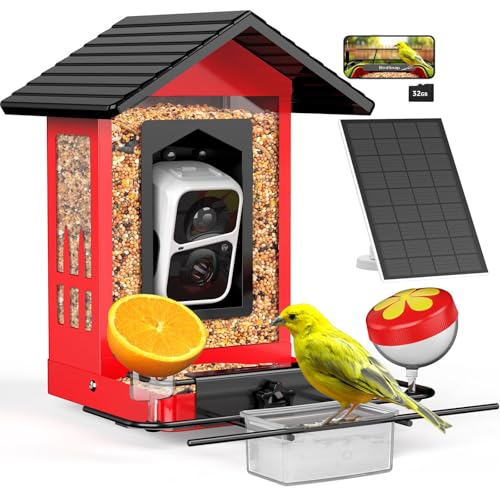 BirdSnap APS Metal Bird Feeder Metal, IP65, a 32GB card included and a 10,000+ species claim - the cheapest metal camera feeder here that ships with local storage. | A metal body with a memory card in the box | $69.99 - View on Amazon #ad Price checked October 17, 2026. How this is funded |
1. A built-in screen for checking clips at the feeder
WOSPORTS 4K Trail Camera
4K, IP66 and a 2.0in LCD so you can review footage standing at the feeder - with the slowest published trigger on this page.
The screen is the practical feature. Without WiFi you are going to walk out to the camera anyway, and being able to scrub through clips on the spot rather than carrying a card indoors to a computer removes most of the friction of the arrangement.
0.2s is the slowest trigger here, and on a chickadee that lands for a few seconds it is fine. On a bird that grabs a seed and leaves, it is the difference that shows up in your footage.
It is explicitly non-WiFi and non-cellular - nothing to pair, nothing to subscribe to, nothing that fails when the router changes. That is either the entire point or a dealbreaker, depending on why you are here.
| Trigger speed | 0.2sThe slowest on this page - still a published figure, which feeder cameras do not give.Source: WOSPORTS 4K Trail Camera - manufacturer listing on Amazon, retrieved 1 September 2026 |
|---|---|
| Capture | 4K video, 48MP stillsSource: WOSPORTS 4K Trail Camera - manufacturer listing on Amazon, retrieved 1 September 2026 |
| Screen | 2.0in LCDSource: WOSPORTS 4K Trail Camera - manufacturer listing on Amazon, retrieved 1 September 2026 |
| Connectivity | Non-cellular, non-WiFiSource: WOSPORTS 4K Trail Camera - manufacturer listing on Amazon, retrieved 1 September 2026 |
| Ingress rating | IP66Source: WOSPORTS 4K Trail Camera - manufacturer listing on Amazon, retrieved 1 September 2026 |
| Minimum focus distance | Not published |
| Species identification | Not publishedTrail cameras do not claim bird ID. |
What it does well
- 2.0in LCD for reviewing clips at the camera
- 4K and IP66
- Nothing to pair and no router to fight - the commonest smart-feeder failure cannot happen
What it does not
- 0.2s trigger - the slowest on this page
- No WiFi, so no remote viewing at all
- No published minimum focus distance
- No bird identification
Skip this: if you want to watch from indoors. It is a camera you go and look at, and the WiFi option above costs the same.
2. 4K with a card in the box rather than a plan to join
iRonrain 4K Bird Feeder Camera (32GB included)
4K and a 32GB card included - the cheapest published route to footage that lives on hardware you own.
#ad Price checked October 17, 2026. How this is funded
A card in the box is worth more than it looks. Local storage is the difference between footage you keep and footage you rent, and 32GB of it arriving with the feeder removes the one accessory purchase most buyers do not realize they need.
It does not, however, answer the subscription question. Storage and identification are billed separately in this category more often than not, and this listing addresses only the first.
Everything else is unpublished, so the honest position is that this is a storage decision rather than a camera decision.
| Video resolution | 4KSource: iRonrain 4K Bird Feeder - manufacturer listing on Amazon, retrieved 1 September 2026 |
|---|---|
| Storage | Built-in 32GB SD cardIncluded rather than sold separately, which is the practical difference from most listings.Source: iRonrain 4K Bird Feeder - manufacturer listing on Amazon, retrieved 1 September 2026 |
| Power | SolarSource: iRonrain 4K Bird Feeder - manufacturer listing on Amazon, retrieved 1 September 2026 |
| Wi-Fi band | Not published |
| Sensor size | Not published |
| Battery capacity | Not published |
| Seed capacity | Not published |
| Species claim | Not published |
| Subscription | Not publishedIncluding a card is not the same as ruling out a plan for the identification features. |
| Ingress rating | Not published |
What it does well
- 32GB card included rather than an extra purchase
- 4K at the bottom of the price range
- Solar
What it does not
- Subscription not addressed - a card does not rule out a plan for the AI
- No published Wi-Fi band, sensor size or battery capacity
- No published seed capacity
- Unestablished brand with a minimal listing
Skip this: if you want the identification to be free as well as the storage. Only the storage is settled here, and the two are billed separately more often than not.
3. A box out of Wi-Fi range entirely
BirdoorKam Owl House (4G, Solar)
2K, solar and a cellular connection instead of Wi-Fi - the one box here you can put where owls actually want to nest.
#ad Price checked October 17, 2026. How this is funded
The cellular connection is the whole argument. Owls want quiet, height and distance from houses, which is exactly where your router does not reach. Every Wi-Fi nest box camera is sited by your network rather than by the bird.
Naming screech owl, and naming the timber, puts this listing ahead of the Wi-Fi box above on disclosure as well as on capability.
The gap is the running cost. 4G needs a SIM and a data plan and the listing prices neither, so treat this as a device with an unpublished monthly cost - the same trap as a feeder subscription, in a different coat.
| Video resolution | 2K HDSource: BirdoorKam owl house, 4G solar - manufacturer listing on Amazon, retrieved 17 October 2026 |
|---|---|
| Connection | 4G cellularThe listing states "(NOT WIFI)" in capitals. That is the feature, not a warning: it works where no Wi-Fi reaches.Source: BirdoorKam owl house, 4G solar - manufacturer listing on Amazon, retrieved 17 October 2026 |
| Power | Solar poweredSource: BirdoorKam owl house, 4G solar - manufacturer listing on Amazon, retrieved 17 October 2026 |
| Material | Sugi wood with anti-corrosion varnishJapanese cedar. A named timber and a named finish is more than most nest box listings give.Source: BirdoorKam owl house, 4G solar - manufacturer listing on Amazon, retrieved 17 October 2026 |
| Target species | Screech owlNaming one species is the closest thing to a published hole size on this page.Source: BirdoorKam owl house, 4G solar - manufacturer listing on Amazon, retrieved 17 October 2026 |
| Night vision | Stated on the listingSource: BirdoorKam owl house, 4G solar - manufacturer listing on Amazon, retrieved 17 October 2026 |
| Alerts | Instant alerts and app controlSource: BirdoorKam owl house, 4G solar - manufacturer listing on Amazon, retrieved 17 October 2026 |
| Data plan cost | Not publishedA cellular camera needs a SIM and a plan. No price is given, and it is the real cost of this box. |
| Entrance hole diameter | Not published |
| Interior dimensions | Not published |
| Battery capacity | Not published |
| Sensor size | Not published |
What it does well
- 4G, so the box goes where the owls are rather than where the Wi-Fi is
- 2K stated
- Solar
- Names its timber and its finish
- Names a target species
What it does not
- Needs a SIM and a data plan, neither of which is priced
- No published entrance hole diameter or interior dimensions
- The dearest nest box on this site
- No published battery capacity, so solar performance in a wet spring is unknown
Skip this: if your box will hang on the garage within range of the house. You would be paying for a cellular radio and a data plan to do a job your existing Wi-Fi does for nothing.
4. A metal body with a memory card in the box
BirdSnap APS Metal Bird Feeder
Metal, IP65, a 32GB card included and a 10,000+ species claim - the cheapest metal camera feeder here that ships with local storage.
#ad Price checked October 17, 2026. How this is funded
The included card is the specification that matters. A feeder that records to a card you already own is a feeder whose footage survives a billing decision, which is the whole argument of the no-subscription roundup.
Metal at this price is unusual and it is mostly a squirrel-and-weather answer rather than a picture-quality one. The 2K claim is the same as on the plastic model.
Oddly, this listing drops the Wi-Fi band the cheaper model in the same range states. Assume 2.4GHz, because essentially everything in this category is.
What it does well
- 32GB card included, so local recording works out of the box
- Metal body at a price where plastic is normal
- Published IP65 rating
- Solar
What it does not
- No published Wi-Fi band, unlike the brand's own cheaper model
- A 10,000+ species claim with nothing published behind it
- No published sensor, battery or seed capacity
- '3 DIY add-ons' is a count, not a list
Skip this: if you want the fullest disclosure in the range - the plastic BirdSnap publishes its band and its solar wattage and this one does not.
Answer 3: cellular, for a box that cannot move
A handful of wildlife cameras use a 4G SIM instead of Wi-Fi. They behave like a smart camera - live view, alerts, app - over the mobile network rather than your router, so they work anywhere with phone coverage.
In this category it is almost entirely a nest box story, and specifically an owl box story. Owls want height, quiet and distance from houses, which is exactly where a router does not reach - so a 4G box is the only way to film one in a sensible place. Owl box cameras covers the two that exist and why the cellular one leads.
No seed feeder camera on this site uses cellular, which makes sense: a feeder is normally sited where you can see it, and that is normally near the house.
The cost to watch is the running cost. A cellular camera needs a SIM and a data plan, and neither listing prices either. That is the same structural trap as a feeder subscription in different clothing, and the three-year arithmetic is the right way to size it before committing.
The in-between case: a smart feeder that keeps recording when the network goes
There is a fourth situation that is not really a no-Wi-Fi problem: you have a network, it reaches, and it is unreliable. Rural broadband, a router that reboots nightly, a signal that drops in heavy rain.
For that, a smart feeder camera with a microSD card is the answer. The camera still needs Wi-Fi to be set up and to notify you, but a card means the clips land on local storage rather than vanishing when the upload fails. The iRonrain includes a 32GB card, and the metal BirdSnap in the BirdSnap review includes one too.
Be clear about what a card does not buy you. It does not make the feeder work offline, it does not give you live view without a network, and - on most of these listings - it does not settle the subscription question, because storage and identification are billed separately more often than not. The no-subscription roundup ranks the feeders that have actually committed in writing.
Four options, side by side
| Smart feeder | Card-only camera | 4G camera | Smart feeder + card | |
|---|---|---|---|---|
| Needs home Wi-Fi | Yes, always | No | No | Yes |
| Needs mobile signal | No | No | Yes | No |
| Live view on a phone | Yes | No | Yes | Yes |
| Names the species | Yes | No | No | Yes |
| Works with no network at all | No | Yes | No | No |
| Recurring cost | Often a plan | None | SIM and data plan | Often a plan |
| Holds seed | Yes | No | No (nest box) | Yes |
| Can review without a phone | No | Yes, if it has a screen | No | No |
The 'names the species' row is the one that decides this for most people. Identification is the feature the whole category is sold on, it is the thing that needs a network, and no card-only camera has it or ever will.
Things that do not work, and are suggested anyway
- Setting it up at home and moving it out of range. It pairs to a specific network and stops working when it cannot see it. This is the single most common version of the idea and it fails immediately.
- A phone hotspot. Technically it may pair, but it means leaving a phone outdoors on a hotspot permanently, burning its battery and your data, and the camera drops every time you take the phone out of the garden. Not a solution for an unattended device.
- Bluetooth. Some cameras use Bluetooth during pairing only. None of them delivers footage over it, and the range would not reach the feeder anyway.
- A long USB cable from the house. This solves power and not connectivity. The camera still has to reach the network over the air.
- Assuming a 5GHz mesh will help. It is the shorter-range band and nearly every camera here is 2.4GHz-only. The dual-band roundup collects the few that publish 5GHz support, and that support is about joining a modern router rather than about reaching further.
What to buy, in one line each
- No broadband at the property. The WOSPORTS 4K Trail Camera. 4K, IP66, a screen on the back, nothing to sign up for.
- Wi-Fi at the house, unreliable, and the feeder is in range. The iRonrain 4K with its included 32GB card, so a failed upload does not mean lost footage.
- A nest box out of Wi-Fi range entirely. The BirdoorKam 4G owl box, with a data plan priced in before you commit.
- Wi-Fi that reaches, and you want the footage on your own hardware. The BirdSnap APS Metal, which ships with a 32GB card and publishes an IP65 rating - the BirdSnap review covers both models in the range.
- Wi-Fi that nearly reaches. None of these. Spend the money on a mesh node instead and buy whatever feeder you actually wanted from the main roundup.
One final note for the people this page is really for. If the reason you are here is that you already own a feeder in an awkward spot, the cheapest fix may not be a camera at all - a camera that clamps to the feeder you already own still needs Wi-Fi, but it costs a third of a new smart feeder and it leaves the feeder where the birds already found it.
Questions people actually ask
Do bird feeder cameras need Wi-Fi?
Yes. Every smart bird feeder camera needs Wi-Fi to pair during setup and permanently afterwards, because the live view, the clips, the notifications and the species identification all travel over your network. There is no offline mode.
Is there a bird feeder camera that works without Wi-Fi?
Not a smart one. The working alternatives are a trail camera that records to a memory card and needs no network at all - the WOSPORTS 4K is the pick, because it has a screen on the back - or a 4G cellular wildlife camera, which exists in this category almost only as an owl box.
Can I set up a bird feeder camera at home and then move it somewhere without Wi-Fi?
No. It pairs to one specific network and stops working as soon as it cannot see it. This is the commonest version of the question and it does not work.
Will a phone hotspot work for a bird feeder camera?
Only in theory. It means leaving a phone outdoors on a hotspot permanently, and the camera drops every time the phone leaves the garden. It is not a workable arrangement for an unattended outdoor device.
Does a memory card mean the feeder works offline?
No. A card means clips survive a failed upload, which is genuinely useful on an unreliable network. The camera still needs Wi-Fi for setup, live view and identification.
How far from the router can a bird feeder camera be?
There is no published figure from any maker, and it depends entirely on walls, foliage and your router. Check it the only way that works: stand at the exact spot, at the camera's height, and look at the bars on your phone. One honest bar with a working speed test is usually survivable.
Do bird feeder cameras use 2.4GHz or 5GHz?
Almost all of them are 2.4GHz-only, which is the correct choice: 2.4GHz travels further and gets through walls and foliage better, and a feeder camera needs range rather than speed.
Is there a bird feeder camera with a screen instead of an app?
Not among the smart feeders - every one of them is app-only. A trail camera with an LCD, like the WOSPORTS, is the only route to reviewing bird footage without a smartphone.