Smart Bird Feeder Cameras
The Best Bird Feeder Cameras for Seniors
The usual rankings weight optics. This one weights the things that decide whether the feeder is still working in six months: how hard it is to set up, how simple the app is, and whether it ever asks for a card number.

How this page is funded. Buying through a link here earns us a commission at no extra cost to you. It does not change what we recommend or the order we recommend it in, and we have not handled any of these products ourselves - see how we pick and the full disclosure.
Most roundups in this category rank on sensor size and resolution. For this buyer those are close to the least important things on the list, and ranking on them produces genuinely bad advice - the best-specified camera in the category is also one of the fiddlier ones to live with.
So here are the criteria this page uses, stated before the ranking, because a ranking you cannot audit is just an opinion.
The criteria, in the order they are weighted
- No recurring charge. A feeder that asks for a card number to name the bird is a feeder that will either be paid for indefinitely or quietly stop doing the thing it was bought for. This outranks everything else here.
- Setup that survives one attempt. Nearly every camera in this category is 2.4GHz-only, and modern routers break that. Anything that reduces the number of steps between box and working feeder matters enormously.
- Refill interval. Capacity is a mobility question, not a convenience one. A hopper that needs topping up twice a week in January is a trip outside in ice twice a week in January.
- Mounting without a ladder. A feeder that has to go eight feet up a tree is the wrong feeder. Pole and wall options at reachable height are better.
- App simplicity. Fewer tabs, fewer prompts, fewer upsell screens.
- Picture quality. It matters, and it comes sixth.
Quick picks
Ranked on published specifications and what each one costs to own. Every pick names the buyer it is wrong for.
| # | Product | Best for | Price |
|---|---|---|---|
| 1 | 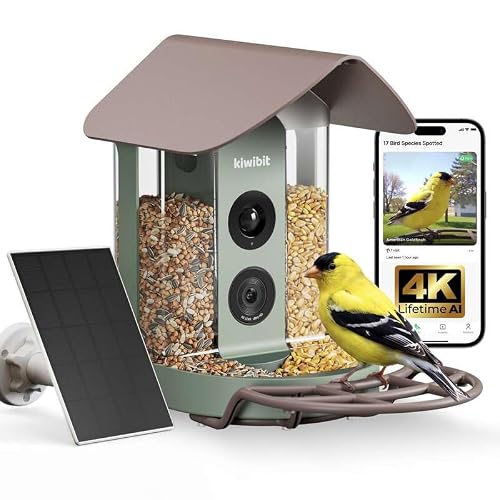 Kiwibit 4K, No-Subscription Edition The same hardware with lifetime AI identification stated on the listing. For a gift, that single line is worth more than any spec on it. | A gift that will never send anyone a bill | |
| 2 |  Birdbuddy Pro Solar The largest published sensor in the category and the only maker that declines to advertise a species count - both of which point the same way. | The best pictures, if you can live with the app | |
| 3 |  Happy Birdy 2.5K The only feeder here rated IP67 rather than IP65, with wall mount and pole strap included and a free AI claim. | An IP67 rating and the mounts in the box | $149.99 - View on Amazon #ad Price checked October 17, 2026. How this is funded |
| 4 |  Netvue Birdfy Lite The entry Birdfy: adjustable brackets, free cloud storage stated on the listing, and the same 6,000+ species claim as its expensive siblings. | The cheapest way into the category |
1. A gift that will never send anyone a bill
Kiwibit 4K, No-Subscription Edition
The same hardware with lifetime AI identification stated on the listing. For a gift, that single line is worth more than any spec on it.
A gift that arrives with a monthly fee attached is a gift that keeps asking the recipient for money. That is the whole argument for this variant, and it is why it leads the no-subscription roundup.
Read the wording carefully before you buy, though, because it is the wording that matters. The listing says lifetime AI identification, not lifetime cloud storage, and those are different promises. Storage terms in this category change quietly, and a lifetime claim on one feature says nothing about the other.
Everything else is the Kiwibit 4K platform: the same 5,200mAh cell, the same 4K stream, the same 8MP stills.
| Subscription | No subscription; lifetime AI identification stated on the listingSource: Kiwibit no-subscription - manufacturer listing on Amazon, retrieved 1 September 2026 |
|---|---|
| Video resolution | 4K live streamSource: Kiwibit no-subscription - manufacturer listing on Amazon, retrieved 1 September 2026 |
| Photo resolution | 8MPSource: Kiwibit no-subscription - manufacturer listing on Amazon, retrieved 1 September 2026 |
| Solar | Solar poweredSource: Kiwibit no-subscription - manufacturer listing on Amazon, retrieved 1 September 2026 |
| Battery capacity | 5,200mAhPublished for the Kiwibit 4K platform.Source: Kiwibit 4K - manufacturer listing on Amazon, retrieved 1 September 2026 |
| Sensor size | Not published |
| Species identified | Not publishedThis listing states lifetime identification without naming a count. |
What it does well
- Lifetime AI identification stated in writing on the maker's own listing
- Nothing to explain to the person you gave it to
- Same published 4K and 8MP capture as the subscription variant
What it does not
- Lifetime AI is not the same promise as lifetime cloud storage
- No published sensor size
- The species count is not stated on this variant, so it cannot be compared like for like
Skip this: if you want the deepest cloud archive you can get. A no-subscription model is a model with a smaller storage story, and if you plan to keep three years of clips you should read the three-year cost comparison before deciding.
2. The best pictures, if you can live with the app
Birdbuddy Pro Solar
The largest published sensor in the category and the only maker that declines to advertise a species count - both of which point the same way.
A 1/2.7" sensor is a real, checkable number, and it is bigger than anything else in this category will admit to. Sensor area is what governs how a photo looks when a bird lands at dusk, which is when most feeder traffic actually happens. Nobody else publishes the figure, so nobody else can be compared to it.
The thing worth noticing is what is missing. Every rival leads with an AI number - 6,000 species, 10,000 species. Birdbuddy prints none. A maker that does not put a number on its recognition claim is a maker with nothing to walk back, and after you read the species-claim audit that reads as confidence rather than as a gap.
The Wi-Fi position is the one to check before you buy. Birdbuddy's own support documentation says the original camera module requires 2.4GHz and does not work on 5GHz. If your router broadcasts one merged network name, that is the setup that fails - and the fix takes ten minutes once you know about it. It is covered in the Wi-Fi requirements guide.
| Video resolution | 2KSource: Birdbuddy Pro Solar - manufacturer listing on Amazon, retrieved 1 September 2026 |
|---|---|
| Photo resolution | 5MPSource: Birdbuddy Pro Solar - manufacturer listing on Amazon, retrieved 1 September 2026 |
| Sensor size | 1/2.7"The only sensor dimension published by any maker in this roundup.Source: Birdbuddy Pro Solar - manufacturer listing on Amazon, retrieved 1 September 2026 |
| Dynamic range | HDRSource: Birdbuddy Pro Solar - manufacturer listing on Amazon, retrieved 1 September 2026 |
| Wi-Fi band | 2.4GHz for the original camera module; the Birdbuddy 2 module adds 5GHzBirdbuddy's own support pages state the original module does not work on 5GHz.Source: Birdbuddy support: Connectivity and Wi-Fi requirements |
| Solar | Detachable solar roof, rotates 180 degreesSource: Birdbuddy Pro Solar - manufacturer listing on Amazon, retrieved 1 September 2026 |
| Battery capacity | Not publishedNo mAh figure appears on the listing or the support site. |
| Species identified | Not publishedBirdbuddy publishes no species count anywhere we could find. See the AI claims audit. |
| Subscription price | Not publishedNot stated on the listing, and the plan page did not serve us a price. |
What it does well
- Published 1/2.7" sensor with HDR - the only sensor dimension anyone in the category states
- Solar roof detaches and rotates, so the panel can face the sun even when the feeder cannot
- Makes no species-count claim, which is the honest position given the arithmetic
- The largest accessory ecosystem in the category, including perch extenders and nutrition sets
What it does not
- Battery capacity is not published, so runtime cannot be estimated from first principles
- The original camera module is 2.4GHz-only per Birdbuddy's own support pages
- Subscription pricing is not stated on the listing and was not retrievable from the plan page
Skip this: if you want every feature unlocked with no ongoing decision to make. Birdbuddy's premium tier exists, its price is not published where a buyer can find it, and buying into an unpriced subscription is exactly the trap the three-year cost guide was written about.
3. An IP67 rating and the mounts in the box
Happy Birdy 2.5K
The only feeder here rated IP67 rather than IP65, with wall mount and pole strap included and a free AI claim.
#ad Price checked October 17, 2026. How this is funded
IP67 versus IP65 is not marketing noise. IP65 means protected against water jets; IP67 means survivable under temporary immersion. On something bolted to a post through a winter of freeze and thaw, that extra digit is the one that matters.
Mounts in the box is worth real money. Several feeders on this page arrive without any way to attach them to anything, and the pole is a $30 afterthought - see the poles and mounts roundup for what that actually costs.
The 10,000+ free-AI claim carries the same caveat as every other 10,000+ claim on this site. It is a claim about a model, not a promise about your garden.
| Ingress rating | IP67One step above the IP65 that is standard in this category.Source: Happy Birdy - manufacturer listing on Amazon, retrieved 1 September 2026 |
|---|---|
| Video resolution | 2.5K HDSource: Happy Birdy - manufacturer listing on Amazon, retrieved 1 September 2026 |
| Night vision | InfraredSource: Happy Birdy - manufacturer listing on Amazon, retrieved 1 September 2026 |
| Species identified | 10,000+ claimed, free appA claim by the maker.Source: Happy Birdy - manufacturer listing on Amazon, retrieved 1 September 2026 |
| Mounting | Wall mount and pole strap kit includedSource: Happy Birdy - manufacturer listing on Amazon, retrieved 1 September 2026 |
| Solar | Solar power panelsSource: Happy Birdy - manufacturer listing on Amazon, retrieved 1 September 2026 |
| Battery capacity | Not published |
| Wi-Fi band | Not published |
What it does well
- IP67 - the highest published ingress rating in this roundup
- Wall mount and pole strap included, so there is no second purchase
- Infrared night vision
- AI identification claimed as free, with no subscription
What it does not
- No published battery capacity or Wi-Fi band
- 10,000+ species is a claim, not a verified capability
- A smaller brand with a shorter track record than Birdfy or Birdbuddy
Skip this: if you want the largest support and accessory ecosystem behind your purchase. That is Birdbuddy and Birdfy, and it matters more than people expect three years in.
4. The cheapest way into the category
Netvue Birdfy Lite
The entry Birdfy: adjustable brackets, free cloud storage stated on the listing, and the same 6,000+ species claim as its expensive siblings.
The Lite exists to get you into the category for as little as possible, and it does that job. What it does not do is publish its capture resolution, which is a meaningful omission on a product whose entire purpose is taking pictures.
The free-cloud-storage line is the most interesting thing on the listing, because free storage is the feature that most often turns out to be the subscription hook. Read the current terms at the point of purchase rather than trusting a review - ours included.
If your budget is the constraint, this or one of the picks in the under-$100 roundup is where to look. If image quality is the constraint, look at the flagship roundup instead.
| Species identified | 6,000+ claimedA claim by the maker.Source: Birdfy Lite - manufacturer listing on Amazon, retrieved 1 September 2026 |
|---|---|
| Cloud storage | Free cloud storage stated on the listingSource: Birdfy Lite - manufacturer listing on Amazon, retrieved 1 September 2026 |
| Mounting | Adjustable bracketsSource: Birdfy Lite - manufacturer listing on Amazon, retrieved 1 September 2026 |
| Smart home | Works with AlexaSource: Birdfy Lite - manufacturer listing on Amazon, retrieved 1 September 2026 |
| Video resolution | Not publishedThe Lite listing does not state a capture resolution. |
| Battery capacity | Not published |
| Solar | Not publishedSolar is sold separately on this model. |
What it does well
- The lowest barrier to entry in the Birdfy line
- Free cloud storage stated on the maker's own listing
- Adjustable brackets suit an awkward mounting spot
- Alexa support, which none of the premium models here advertise
What it does not
- No published capture resolution at all - unusual and unhelpful
- Solar is a separate purchase
- Carries the same 6,000+ species claim as the flagship, which is telling
Skip this: if the photographs are the point. A feeder camera that will not state its own resolution is a feeder camera you are buying blind, and for a small step up the Birdfy 2 Pro publishes everything.
Why the no-subscription model leads
The top pick is not the best camera on this site. It wins here because of one line on its listing: lifetime AI identification, with nothing recurring.
Consider what the alternative actually looks like. Species identification - the feature the whole category is advertised on - is routinely held behind a monthly plan, and most makers do not publish what that plan costs anywhere on the listing you buy from. So the realistic sequence is: the feeder arrives, it works, and some weeks later the app stops naming birds and asks for payment. For a gift in particular, that is an unpleasant surprise landing on someone who did not choose it.
Read the wording carefully even so, because it is precise: lifetime AI identification is not the same promise as lifetime cloud storage, and storage terms in this category change quietly. The three-year cost guide runs the arithmetic, and the no-subscription roundup collects every model that avoids the problem.
The setup problem, and how to remove it
This is where these purchases fail, and it fails the same way every time. Nearly every feeder camera here connects only to 2.4GHz Wi-Fi. Most current routers and effectively every mesh system broadcast 2.4GHz and 5GHz under one network name and steer devices between them - and a 2.4GHz-only device often cannot join that network at all.
It presents as a broken product. The app scans, finds nothing, times out, and every other device in the house works perfectly. It is a router setting, not a fault, and it takes about ten minutes to fix once you know.
The practical recommendation, and it is the most useful thing on this page: do the pairing for them, at their house, before you wrap it. Split the router's bands or set up a dedicated 2.4GHz network, join the camera, confirm it holds a signal at the actual feeder position, and hand over something that already works. The Wi-Fi requirements guide is the walkthrough.
Where to put it, which decides more than the model
Three placement rules that matter more here than in a general roundup.
Close to the house. Signal strength falls off fast and a feeder at the end of the garden is the one that drops offline every evening. Closer is also a shorter walk in bad weather, and it puts the real bird - not just the camera feed - in view of a window.
At a reachable height on a pole, not up a tree. An adjustable pole lets the height be changed after the first week without a ladder, which is worth more than it sounds; the poles and mounts roundup covers the options. A pole also keeps the feeder clear of branches squirrels launch from.
Somewhere with real sun on the panel, if the model is solar. In shade the roof is decoration and the camera becomes a device that has to be carried indoors to charge - which is exactly the chore this buyer does not need. The charging guide explains why so many solar feeders never reach full.
Honest downsides of each pick
Every pick on this site names the buyer it is wrong for, and the full cases are on the cards above. In short:
| Pick | The real downside |
|---|---|
| Kiwibit no-subscription | Lifetime identification is not lifetime cloud storage, and no sensor dimension is published. It is the right billing model rather than the best optics. |
| Birdbuddy Pro Solar | The best-documented optics here, but the plan price is not published anywhere a buyer can check it - so it is the pick that needs the most care about what gets enabled later. |
| Happy Birdy 2.5K | IP67 and mounts in the box, but no published battery capacity or Wi-Fi band, and a much shorter brand track record than the two above it. |
| Birdfy Lite | The cheapest way in, and it publishes no capture resolution at all - which on a camera is a strange omission. Solar is also a separate purchase. |
If they already feed birds
This is the easiest version of the purchase and it is worth checking before you choose anything, because it removes the biggest risk in this category.
A new feeder anywhere takes days to weeks to be found and trusted. That gap is where people conclude the camera is broken, and it is entirely avoidable if there is already an established feeder in the garden - birds are using that spot, so a camera feeder put in the same position starts producing clips almost immediately.
So: put the new one where the old one was, not where the Wi-Fi is best, and move the old feeder a few yards away rather than removing it. Keeping both up for a few weeks means the birds never lose the food source they know, and the camera inherits the traffic. The setup guide covers the first three weeks in more detail.
Whose phone, and whose account
This is the practical question that decides whether the feeder is still being used in six months, and no listing addresses it.
Every camera in this category is operated through an app, and identification runs on the maker's servers rather than on the camera - so there is an account, an email address and a password involved before any bird is named. Decide up front whose account it is. If you set it up under your own email and then hand over the feeder, every password reset and billing email comes to you, which is either a feature or a nuisance depending on the household.
The arrangement that works best in practice: create the account on the recipient's own email, install the app on their phone, and add yourself as a second viewer if the app supports it. That way notifications land where the birds are and you can still help when something needs changing. Most apps in this category support sharing a feed with another device, which is also how grandchildren several states away end up watching the same cardinal.
One more thing worth doing at setup: turn the notification frequency down. A busy feeder in January can generate dozens of alerts a day, and the fastest way to make someone stop using an app is to make it buzz constantly. Fewer, better alerts is the setting that keeps this pleasant.
What about a bird bath or a nest box instead?
Worth a sentence, because both get recommended to this buyer and one of them is a poor fit. A bird bath needs emptying, scrubbing and refilling every few days in warm weather - that is more physical maintenance than a seed feeder, not less, and the comparison is here.
A nest box camera produces the best footage anything on this site can, and it produces it for about six weeks a year. As a first camera it disappoints; as a second one it is wonderful. What a nest box camera actually shows you sets the expectation honestly.
The short answer
Buy the no-subscription model, mount it on an adjustable pole within thirty feet of the house in a spot that gets real sun, and pair it yourself before handing it over. That combination removes every common failure in this category, and it matters far more than which camera you chose.
If the picture quality genuinely is the point - and for some people it is - buy the Birdbuddy instead and accept that you will need to keep an eye on what the app starts charging for. The flagship roundup ranks the whole field on optics.
Questions people actually ask
What is the easiest smart bird feeder to set up?
The setup difficulty is much the same across the category, because the hard part is the router rather than the feeder - nearly all of these are 2.4GHz-only and modern routers steer devices toward 5GHz. The single most useful thing you can do is pair it yourself at the recipient's house before giving it.
Which bird feeder camera has no monthly fee?
Several state lifetime identification or no subscription at all, and the top pick on this page is one of them. Read the wording precisely though - lifetime AI identification is not the same promise as lifetime cloud storage.
How often will it need refilling?
Depends entirely on capacity and how busy the feeder is. In cold weather a small hopper can empty in a couple of days, which is the thing to weigh if trips outside in ice are a consideration. Larger hoppers are covered in the squirrel-proof roundup, which is where the biggest capacities are.
Does it need a smartphone?
Yes. Every camera in this category is operated through a phone or tablet app, and identification runs on the maker's servers rather than on the camera. There is no model on this site that works without one.
Can it be mounted without a ladder?
Yes - an adjustable pole is the better answer than a tree for exactly this reason, and it lets the height be changed later without climbing anything. Some models include a pole or a wall mount; most do not.
Have you tested these feeders?
No, and we say so on every page. We compile published manufacturer specifications, print the figures makers decline to publish, and do the cost arithmetic. Nobody here has handled one of these products.